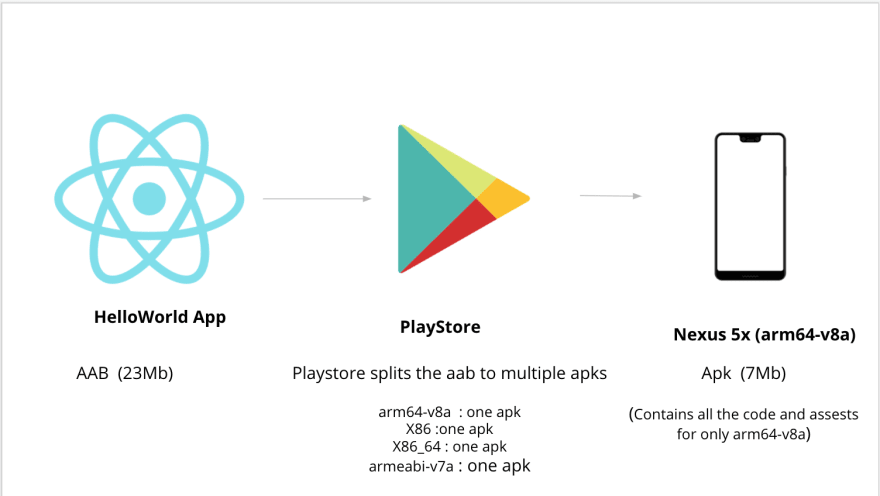
Whether your app is a single screen Hello world or something basic. React Native will create a huge 23-28MB apk for it.
When it comes to app stores, people will choose light apps to use. So, if you provide them with an unexpected sized app but with less features, they will throw it into dustbin!
So, what to do? Let’s see, why this happens.
Behind the APK
Each time you build apk, react native combines four ABI in one APK.
- armeabi-v7a
- arm64-v8a
- x86
- x86_64
So, your APK becomes approximately four times bigger than it should be.
Android App Bundle
Different Android devices use different CPUs, which in turn support different instruction sets. Each combination of CPU and instruction set has its own Application Binary Interface (ABI).
Medium says
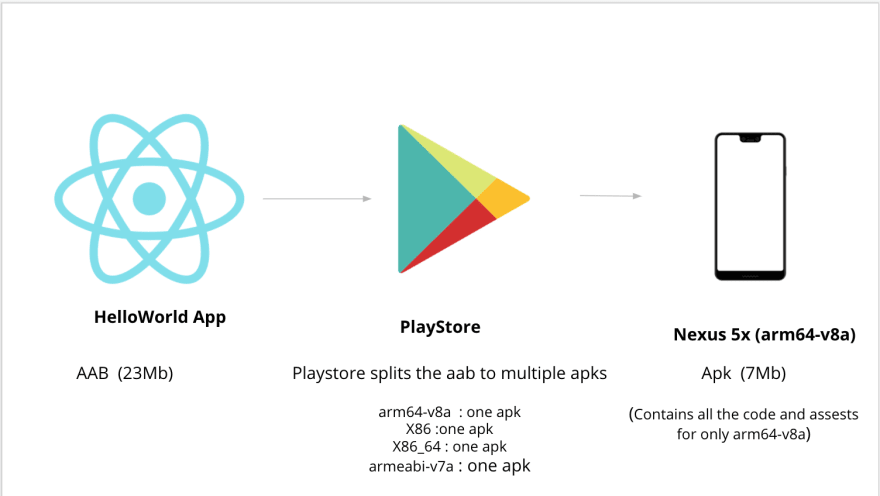
Each time user installs the app, Android installs only one ABI according to its CPU. This reduces the app size.
How to produce AAB?
Generally, we use this line to produce APK.
cd android && ./gradlew assembleRelease
To produce AAB, we need a small change.
cd android && ./gradlew bundleRelease
This will export the app at the following location
android/app/build/outputs/bundle/release/app.aab
You can upload this file to Google Play Store.
Shrink More!
Proguard is an effective shrinking tool. It’s enabled by default in the latest versions of React Native. Make sure your app level build.gradle includes this
def enableProguardInReleaseBuilds = true
Also make sure you have this:
def enableSeparateBuildPerCPUArchitecture = true
And this(optional) :
universalApk = false //however, make this true for other app stores except Google Play
If your App uses Icons, make sure you copy only the specific icon library you need. Suppose, I want to use Feather Icons from react-native-vector-icons. So, I will write like this in app level build.gradle file:
project.ext.vectoricons = [ iconFontNames: [ 'FeatherIcons.ttf' ] // Name of the font files you want to copy ]
apply from: "../../node_modules/react-native-vector-icons/fonts.gradle"
While using Images and Videos, you should use webp format. This reduces the media size by 10-30%
Final Words…
If you upload the AAB file now to Google Play store. You will notice, that the approximate APK size is 70-80% lesser than before.
This is a huge change. This makes your app user friendly too. Let me know if you have any further questions.
Happy Developing!
 Tech Eggs Daily