Why should you start using the New Microsoft Edge?
Edge Developers has added a lot of new features that can attract users. This Chromium Based Browser is a good alternative to Google Chrome.
At least for the new features, I think, you should check it out. Let’s see what makes Microsoft Edge outstanding
Last Updates are Avaliable
The lastest features is avaliable for Windows 10 users. If you have updated your Windows within the last two days, then, you should be able to check the new Edge
1. Collections
Collections is an attractive feature for users. This is almost same as Notes or Bookmarks. The embedded video describes it all. According to September 1 update, this feature is available for androids too.
Microsoft says more:
We continue to add functionality within this feature and, coming soon, you will have the ability to send to OneNote, in addition to the export to Word and Excel that are available today. Collections in Microsoft Edge is collaborating with Pinterest to help you discover relevant content for your research or project.
2. Vertical Tabs
This is going to be a useful feature for users. This is a good solution for the problem of finding the right one from tons of horizontal tabs. You can easily shift between your tabs.
Microsoft Says,
This allows you to easily see the titles and access controls like mute and close. It even makes it easy to reorder your tabs, with the ability to drag and drop to rearrange. When you want to focus on a specific page, you can collapse the pane
4. Smart Copy (My favourite)
This is my most favourite feature of Edge. Just look at it. This is undoubtedly a useful tool for writers and developers.
Smart copy makes it easier to select, copy, and paste content that you find across the web, maintaining source site’s formatting, spacing and text. Use your mouse to select any area or content (including charts, images, etc.) and when you paste, you will get the option to paste as an image or to retain the original source formatting, saving you valuable time
Microsoft says
5. PDF Reader Updates
Microsoft has added a few new features in its PDF reader to beat chrome. The-
- Text Highlight
- Drawing on File (Coloring, Erasing)
- Read Aloud Feature
- Grammar Tools
6. Password Monitor
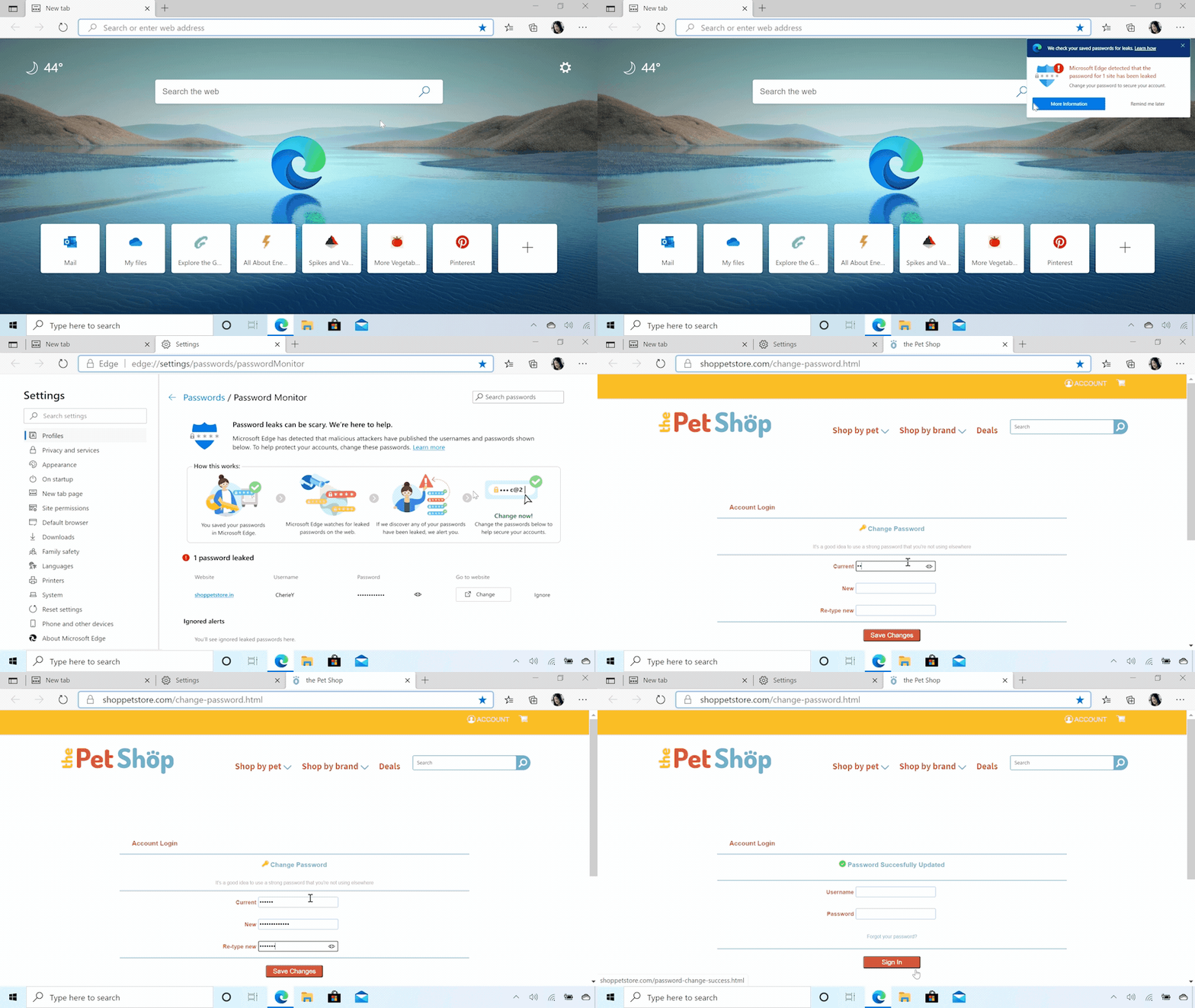
This is a completely new feature in browsers. Microsoft says
Today, we’re announcing Password Monitor in Microsoft Edge to help keep your online accounts safe from hackers. When enabled, Password Monitor is a feature that notifies you if the credentials you’ve saved to autofill have been detected on the dark web. If Microsoft Edge uncovers a match with any of your saved username + passwords, you will receive a notification from within the browser prompting you to take action. Through a dashboard in Settings, you can view a list of all leaked credentials and get routed to their respective websites to change your password. Once the password has been changed, save the new credential to autofill and continue browsing with peace of mind knowing that Microsoft Edge and Password Monitor have your back
Password Monitor is a must for privacy aware people. Though, Edge is not a privacy focused browser as Firefox. But the new features related to Privacy protection worth attention.
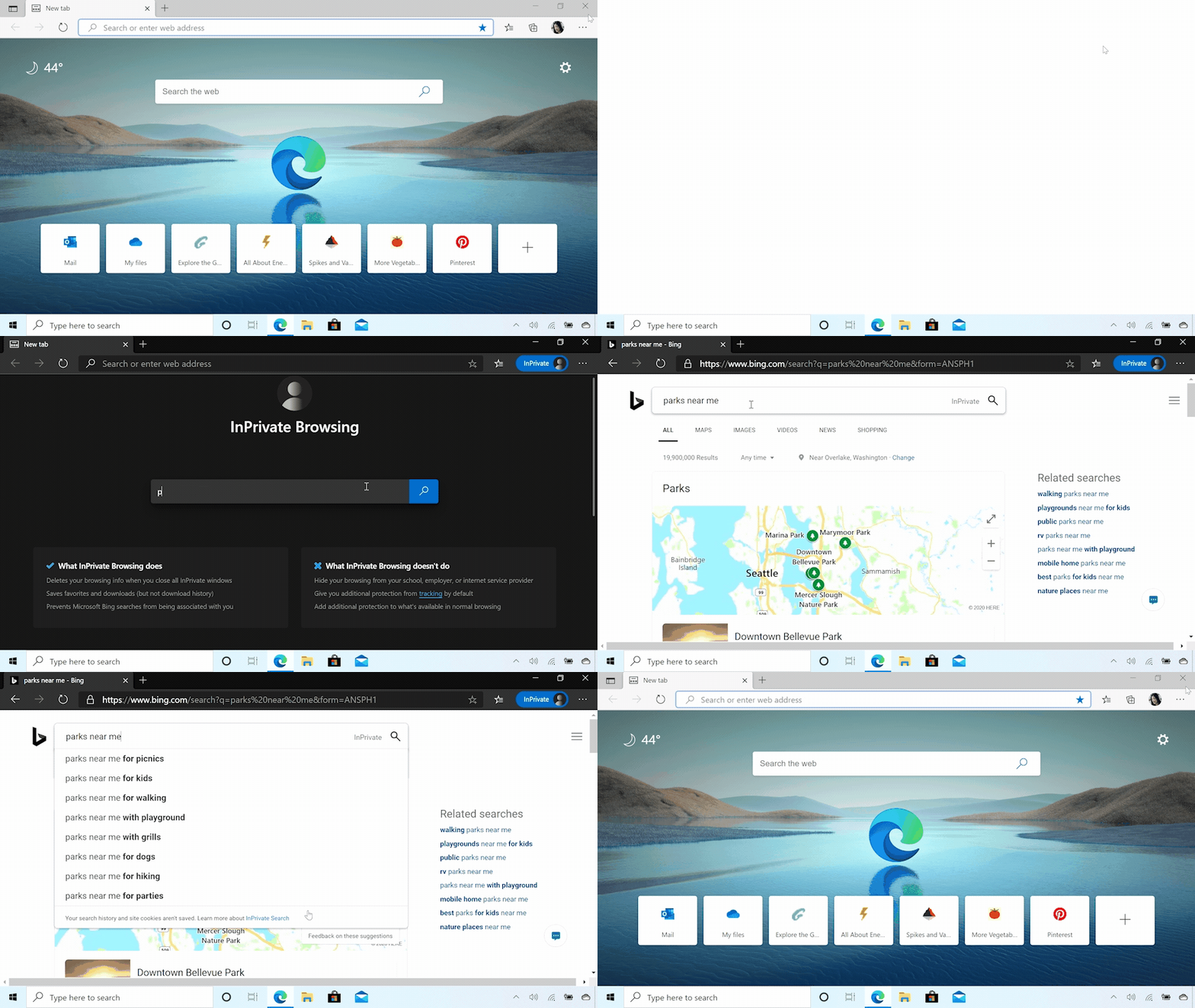
7. InPrivate Mode
Just a different name for Incognito Tabs of Chrome. There is nothing new here actually. But you can check it out.
8. Story of the Rest
These are not all.
Meanwhile, Edge is adding features that help keeps your kids safe as they browse online via its recently launched family safety app. You can now get activity reports on the sites your kids visit and the search terms they enter, and you can control the content your kids see. InPrivate browsing is also blocked in Edge to make sure your kids stay safe.
Forbes says
There’s important for news for businesses too—Edge 85 also adds the ability to synchronize browser favorites and settings between Active Directory profiles within your own environment without the need for cloud sync. Group policy support has been added that lets administrators add site + app combos that are trusted to launch without the confirmation prompt
Forbes says
These are upcoming features, should be added soon.

 Tech Eggs Daily